

Locking Benefits
By locking your $PEC tokens, you unlock additional benefits that grow with the amount you lock. Locking does not generate interest or dividends — it provides functional benefits within the platform.
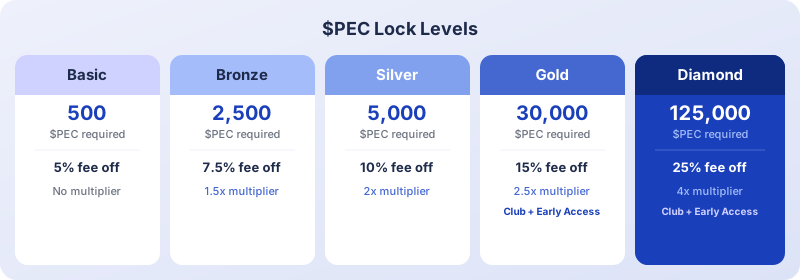
Lock levels
How to lock your tokens
- Go to PEC Token > Lock in the sidebar
- Choose the amount of $PEC you want to lock
- Confirm the transaction
- Your benefits are activated immediately
Important rules
- Locked tokens become non-transferable for 120 days after your last deposit
- You can add more tokens to increase your level, but this resets the 120-day lock period
- Benefits are applied instantly when you reach a new level
Stacking with NFT benefits
If you hold Pecunity NFTs that also provide fee reductions, the benefits are not cumulative. The higher discount applies.
For example: if your lock level gives 15% reduction and your NFT gives 10%, you get 15%.
How fee reduction works in practice
Fee reductions from locking stack with the base 20% discount from paying with $PEC:
- Base fee for an action: $1.00
- Pay with $PEC: $1.00 × 0.80 = $0.80 (20% discount)
- Gold lock level: $0.80 × 0.85 = $0.68 (additional 15% reduction)